SMARTe DAAS Pvt Ltd.
2024
My Role
Lead Designer - UI/UX Design Interaction Design, Prototyping.
Team
Me, my product manager Aashish and our dev team
Timeline
October 2023 - March 2024
Overview
SMARTe is a comprehensive sales intelligence platform designed to empower B2B sales teams with accurate contact data, advanced prospecting tools, and real-time data enrichment.
As the lead product designer, I was tasked with completely redesigning the platform's user interface, creating a design system, and rebranding to align with current industry trends and user expectations.
The Core Problem |
When I joined SMARTe, the platform was already trusted by global sales teams — but behind the scenes, cracks were showing.
Support tickets were piling up. SDRs were spending too much time handholding users. And in sales calls, one theme kept repeating:
“I just want to find the right contacts quickly — but it’s slow, confusing, and frustrating.”
The UI felt dated and overloaded. Lists took too long to load. Filters behaved inconsistently. Pagination was clunky. Visual hierarchy was almost non-existent — users weren’t sure what to look at or trust.
Even experienced users were stumbling through basic actions like refining searches or exporting clean lists.
It was clear: what should have been a powerful data product, felt like a maze. And it was costing us both user trust and efficiency.
Research & Insights
Before touching any screens, I needed to understand why users were struggling — and how other platforms were getting it right.
Competitive Teardowns
We explored top players like ZoomInfo, Apollo, and Lusha and found some key takeaways:
Cleaner filters with real-time feedback
Faster, simpler list-building flows
Clear visual hierarchy on contact cards
User Interviews (High Friction Clients)
We spoke to some of our most frustrated clients — the ones who had raised multiple tickets or escalated to sales, Their feedback was brutally honest
“filters are confusing”
“Exporting clean data feels like guesswork.”
“It’s faster to sort lists manually.”
Internal Team Insights
We interviewed SDRs, customer success, and data ops to gather internal patterns
SDRs manually walked users through filter logic.
Sales avoided live demos due to slowness.
Support got repeat queries about basic features.
Product Metrics & Analytics
28% drop-off mid-filtering → users gave up on narrowing results.
Frequent export errors → leading to junk data and wasted outreach.
Day-1 engagement drop-off in new user cohorts.
Users didn’t lack functionality — they lacked clarity and confidence.
Ideation & Early Concepts
We kicked off the redesign not with pixels — but with deep structural thinking.
Before jumping into visuals, I compiled a PRD, breakdown of core user flows, content needs, and layout priorities. Alongside it, I mapped out wireframes for the Company Results, Contact Profile, and Dashboard — focusing on what needed to be shown, hidden, grouped, or deprioritized based on user pain points.
To stay aligned with modern SaaS patterns, I also curated a reference board — pulling from 15+ well-designed tools (like Dropbox, Linear, Notion, ZoomInfo). This ensured we were not just solving SMARTe's specific problems but doing so with familiar, intuitive patterns.
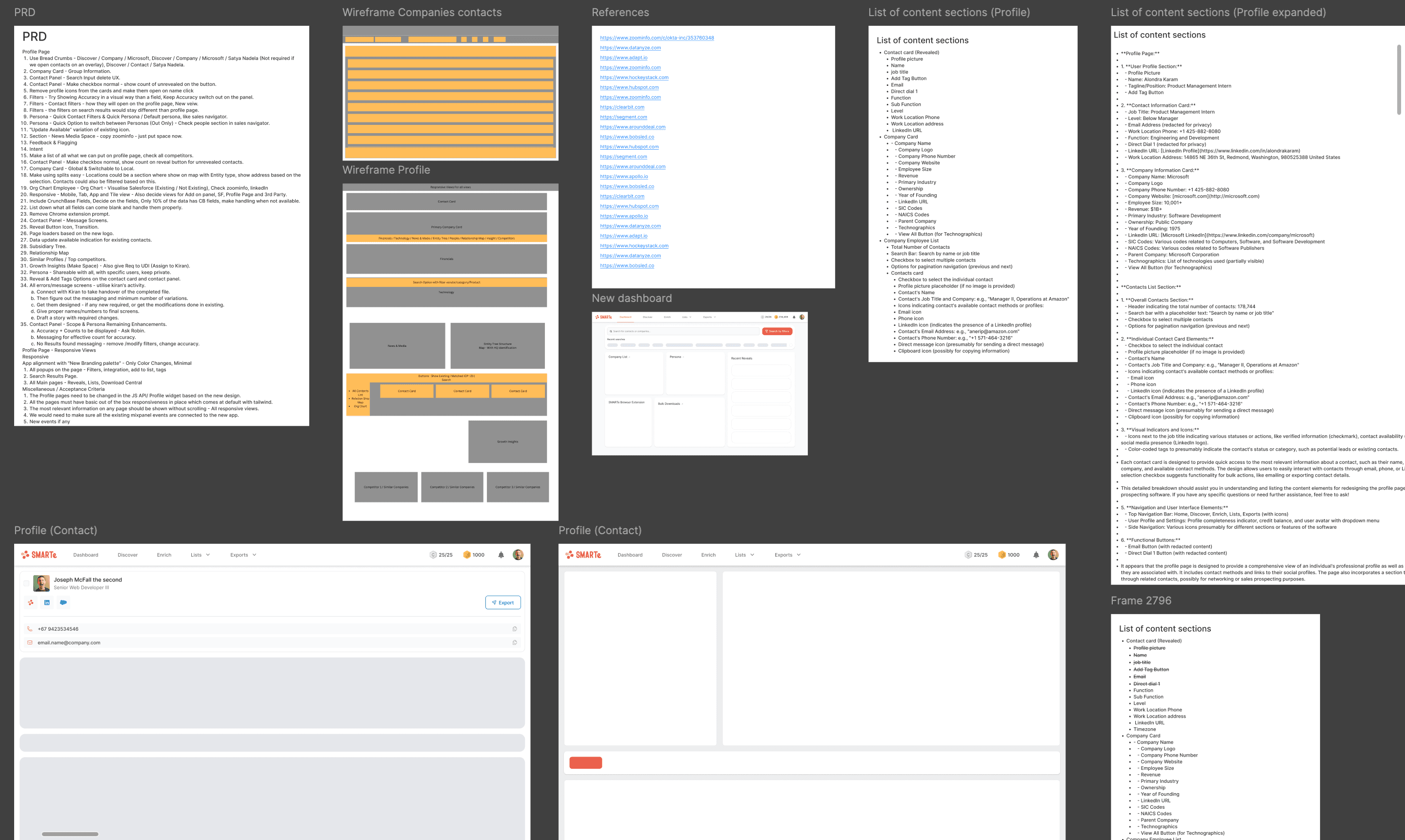
This wasn’t a solo effort — I collaborated closely with PM Aashish, iterating quickly in Figma. Even low-fidelity explorations stayed within the tool to speed up feedback cycles and maintain continuity.
What We Explored
Layout variants: Started with a list view to support quick scanning and comparison. We briefly tested grid-style layouts, but prioritized list-based readability for our first full UI pass.
Visual direction: Avoided overly stylized UI or heavy theming; focused on spacing, typography, and alignment for clarity.
Dropped directions: Explored a filter system that sat in the top header and a floating export bar. Both created more confusion than clarity for new users and were dropped early in testing.
Real-Time Feedback
We shared early drafts with SDRs and product teams:
Loved the cleaner structure and simplified visual hierarchy
Pointed out issues with filter discoverability and chip overload
Helped us rethink grouping logic, microcopy, and hierarchy of actions
Design Execution & Iterations
We knew the redesign wouldn’t scale unless it was built on a solid foundation. So before finalizing screens, I focused on establishing a clean, modular Design System that could support our product across all flows — from search results to onboarding.
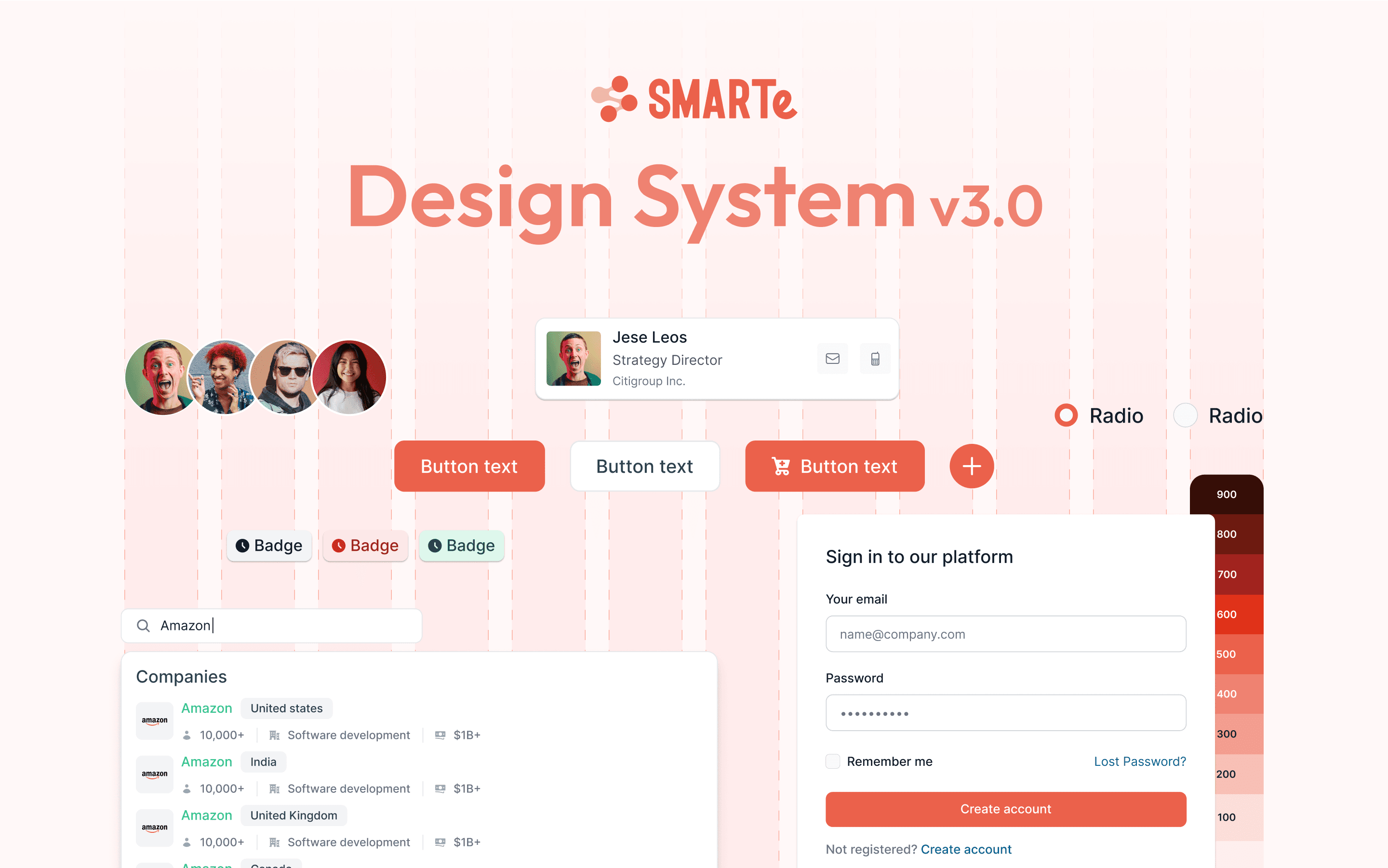
Design System v3.0: Foundation First
This version wasn’t just a UI kit — it was a set of systemized building blocks made for clarity, speed, and reuse.
Buttons: Primary, secondary, and icon-based actions with strict padding and elevation rules
Badges: Color-coded by status and actionability
Avatars & Cards: Designed for visual consistency across contact lists, reveals, and personas
Form Elements: Inputs, radios, and dropdowns aligned with our 12-column grid
Color System: A refreshed red-based scale (100–900) for consistent UI states like errors, hovers, and active highlights
We enforced vertical rhythm using a 12-column layout grid — helping achieve alignment across the smallest cards to the widest dashboards.
First Iteration – Executing Core Screens
With the design system in place, I began applying it to SMARTe’s key surfaces. The goal: make everyday tasks faster, more intuitive, and visually clear — without overwhelming users.
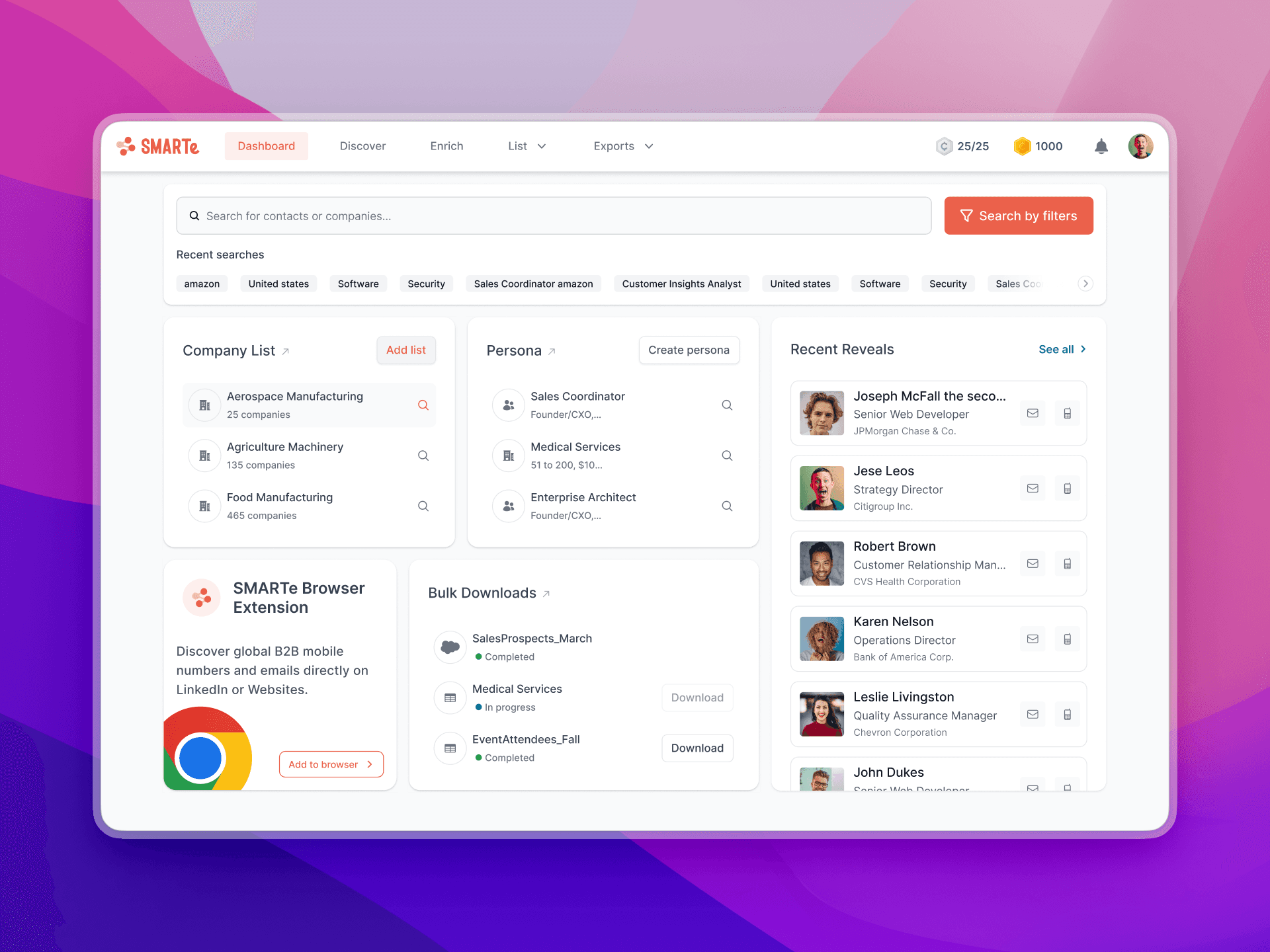
Dashboard Redesign
We stripped down the cluttered original dashboard and restructured it into four clean blocks :
Company Lists
Personas
Recent Reveals
Download Center
Each widget was designed to feel independent but visually cohesive. We added subtle hover states, improved typography, and reduced the total number of visible items to avoid overload.
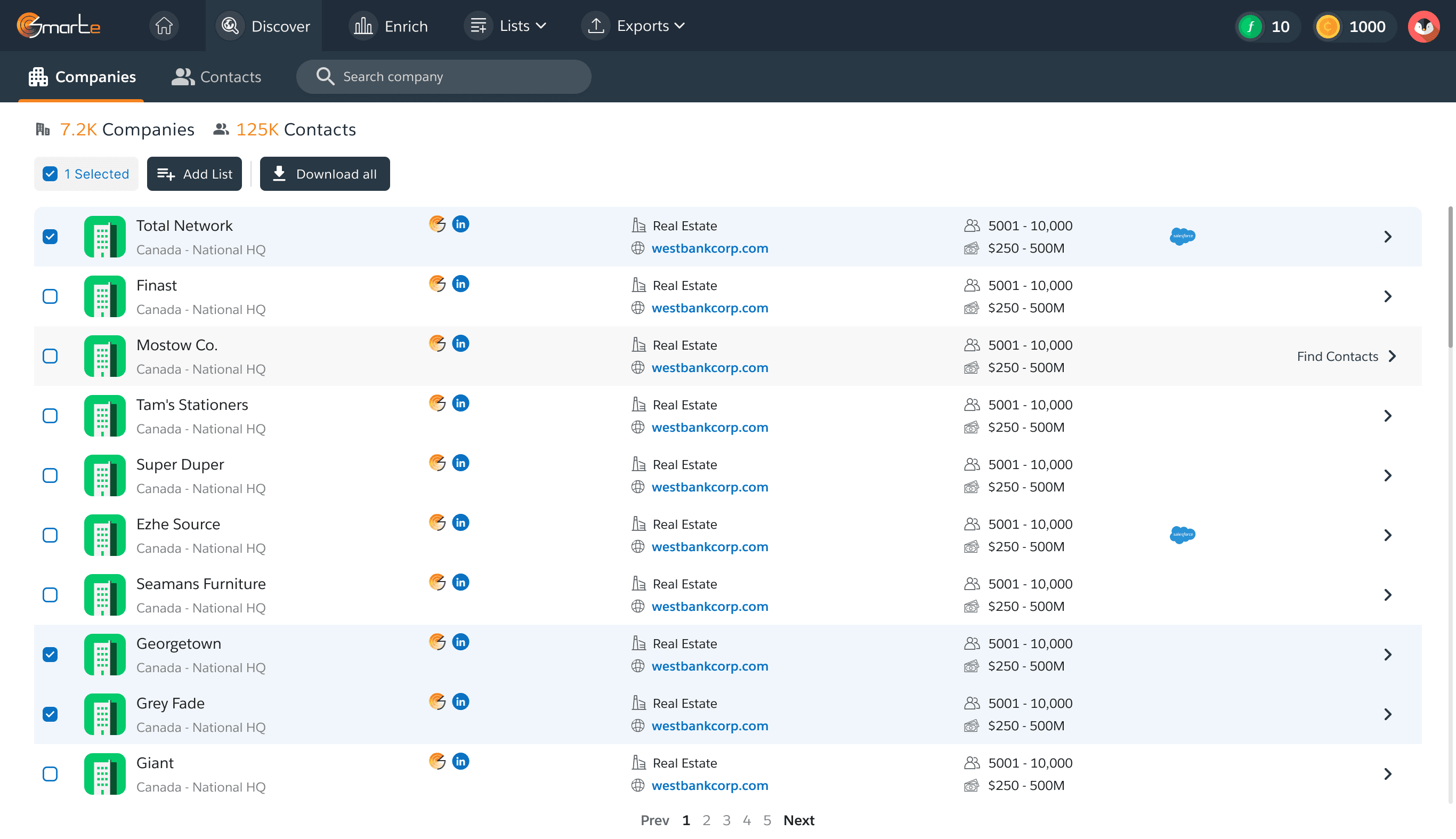
Company Result Page
The original layout was dense, hard to scan, and visually flat. Using v3.0 components, I redesigned the results into a more structured list
Key improvements :
Quick Filters on Sub-nav: We surfaced frequently used filters (like region, size, industry) directly under the nav for faster access, reducing clicks and context switching.
Emphasized Filter Button: Increased contrast and placement priority made filtering more discoverable, especially for new users.
“Add to List” Shortcut: What was once a 3-step modal was turned into a quick dropdown action — enabling users to save companies to lists in one click.
Clean Visuals: Better spacing, tag grouping, and icon consistency for industries, revenue, employee size, and tech usage.
We prioritized list view in the first version to cater to bulk workflows — like list building and exporting — which demanded speed and clarity.
Contact profile page
We transformed a dense, fragmented layout into a structured, insight-first experience that feels lighter, faster, and more actionable.
Top-aligned contact & company details for instant context
Grouped information by mental model (not data source) — makes scanning easier
Clear actions like “Add Tags” and “Export” placed up top for faster workflows
Inline accuracy, timezone, and priority tags to support smarter outreach
Searchable employee directory with reveal/export shortcuts
Tabbed navigation for firmographics, technographics, and funding data
Grid-style tech stack view to showcase tools used at scale
Readable firmographic blocks with all key data in one glance
Feedback & Friction
SDRs felt the results view was easier to navigate, but mentioned filter toggling still felt disruptive
Some users missed real-time filtering — especially during live list building
There was confusion around filter resets and applying new queries
Second Iteration – Side Filter Panel
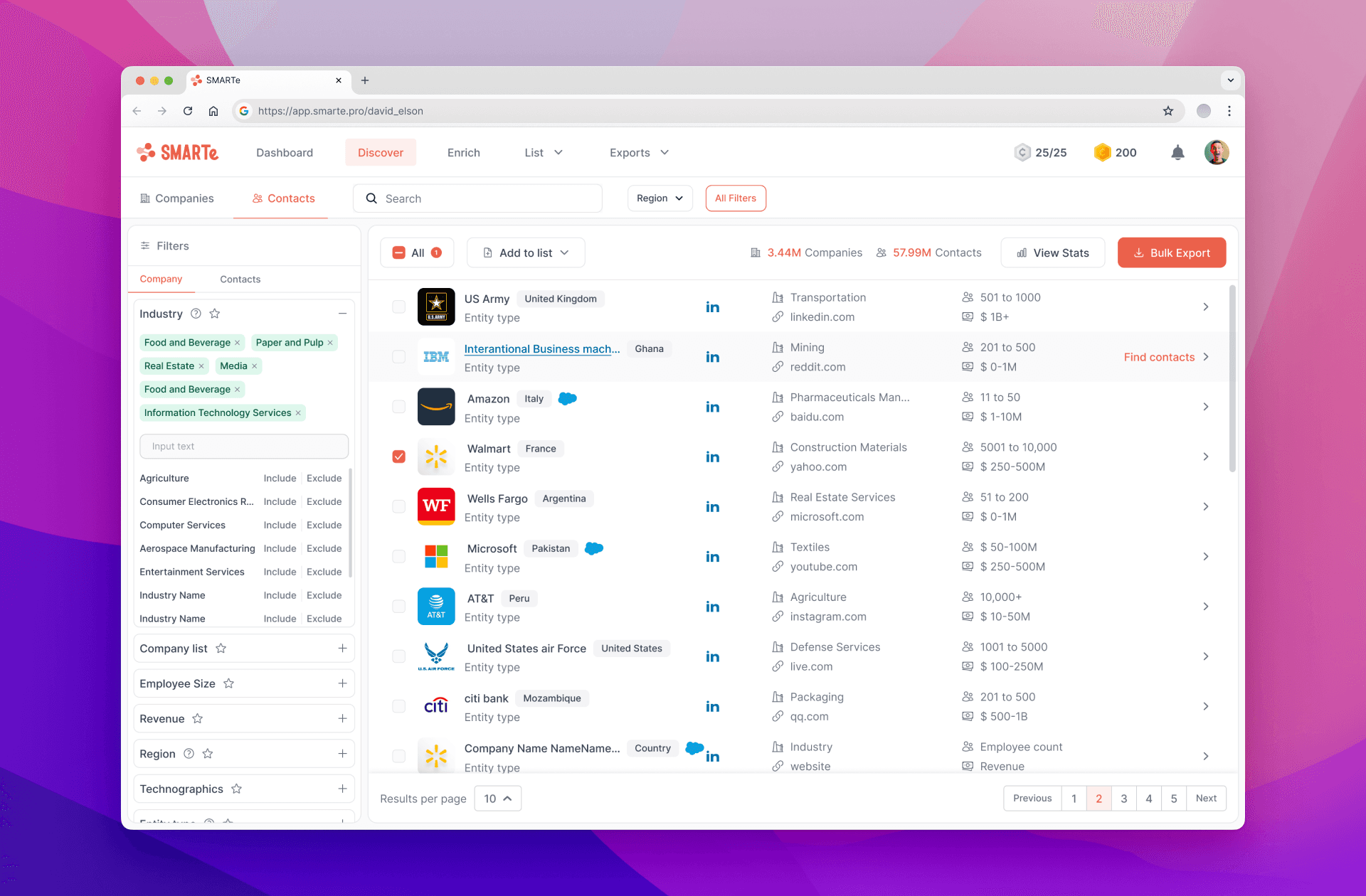
To address this, we introduced a side filter panel in Iteration 2
Made filters persistent alongside results
Reduced need for pop-ups and context switching
Enabled users to tweak and view results in real-time
Outcome & Business Impact
On the engineering side, performance was a key focus. The dev team upgraded our front-end framework in parallel, which helped cut down load times significantly — especially on result-heavy pages like company discovery and contact exports.
These backend upgrades, paired with the new UI, resulted in a noticeably faster, smoother product experience.
After launch, the redesigned SMARTe experience immediately began showing positive traction across key usage and engagement metrics.
18% increase in successful Bulk data exports after redesign of results and filters
Task completion time dropped by ~35%, especially in lead discovery and list-building flows
Support tickets related to filtering and export issues reduced by 40% within the first 3 weeks
Internal SDRs fully adopted the side filter panel, reporting faster workflows and better control during live demos
One of the most tangible outcomes of the redesign was its impact on sales demos. Previously, reps hesitated to present the product live due to inconsistent performance and clunky UI.
After the revamp :
The new layout felt simpler to explain and visually clearer for prospects to follow.
Filters were more predictable, exports were easier to trigger, and page transitions felt snappier.
The interface felt “demo-ready,” which increased live demo usage by the sales team.
“I don’t need a backup deck anymore. The product speaks for itself now.” — Sales Manager
This confidence directly impacted revenue, enabling smoother onboarding of new clients and shortening the sales cycle — a win beyond just design KPIs.
What This Project Taught Me
Redesigning SMARTe was a deep dive into solving real problems for real users — not just refreshing UI, but reshaping how people interacted with data under pressure.
Here’s what I learned along the way :
Clarity = Speed = Confidence
Users weren’t asking for more features — they just wanted to trust what they were seeing. By improving visual hierarchy, simplifying flows, and making actions more obvious, we helped users move faster and with more confidence.
Micro-interactions matter more than we think
Small details — like a persistent filter panel, hover states, or in-context export dropdowns — created disproportionately big improvements in usability.
Design systems make scale feel effortless
Establishing the v3.0 design system early gave us the flexibility to build, test, and iterate rapidly — without compromising consistency across screens.
Design is a team sport
Regular feedback loops with PMs, SDRs, and support teams helped validate decisions before over-investing. Co-creating with the people closest to the pain points made the work sharper and more relevant.
Closing notes
If you’ve made it this far—thank you for taking the time to read through my case study. I’ve poured a lot of thought, effort, and care into this work, and I hope it gave you a glimpse into how I approach product design when it truly matters.

Akash Singh
Product designer
Check other works